

AI agents
AI agents for business that take real actions, inside clear limits
We build AI agents for business that complete multi-step tasks on their own: researching a company, checking several systems, deciding what to do next and taking the action, with a person approving anything that matters. They are for ops and sales leaders whose teams lose hours to work that follows a pattern but needs judgment at each step, such as qualifying inbound accounts, preparing renewal briefs or reconciling records across tools.
Get a free build plan
Two lines is enough. A specialist replies within one business day.
Quick answer
What are AI agents for business?
AI agents for business are AI systems that pursue a goal across several steps, choosing which tools to use along the way, such as searching the web, querying a CRM, reading a document or updating a record. Unlike a chatbot, an agent acts. Well-built agents run inside tool limits, approval steps, logging and a cost cap per task.
- An agent chooses its next step; a workflow follows a fixed path.
- Every agent gets an explicit tool list, with write tools behind approval.
- Step limits and cost caps per task stop runaway loops.
- We test agents on real past tasks before they touch live systems.
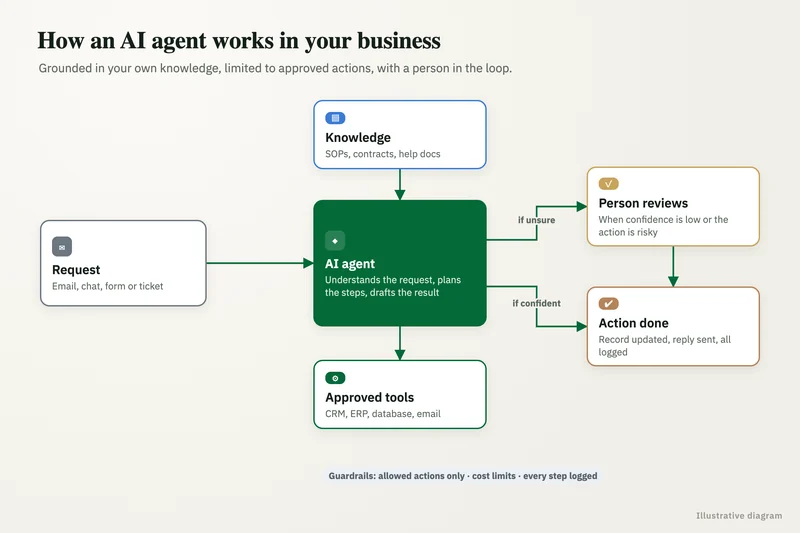
What are AI agents for business, and how do they differ from chatbots?
A chatbot answers a question; an agent completes a task. Ask a chatbot about a customer's contract and it finds the relevant clause. Ask an agent to prepare a renewal brief and it pulls the contract from SharePoint, usage from your product database, open tickets from Zendesk and recent emails from HubSpot, then writes the brief and files it on the renewal record.
The difference matters for risk. A chatbot that is wrong gives a bad answer someone can ignore. An agent that is wrong can change a record, send an email or create a purchase order. That is why agent development is mostly about the limits around the model rather than the model itself.
Which tasks are good candidates for an AI agent?
Good candidates repeat often, involve looking things up in several places, and end in a decision a person can check quickly. Poor candidates are rare, high-stakes or impossible to verify.
One of our case studies fits the pattern well: for a sourcing and supplier quality consultancy we built two tools that find candidate suppliers and apply the client's screening rules automatically, delivering an 85% time saving and a 91% cost saving on supplier scouting. The work was multi-step research with clear criteria at the end, which is where agents earn their keep.
- Inbound account research and qualification before a rep calls.
- Renewal and account review briefs assembled from several systems.
- Supplier or vendor research against written screening rules.
- Record reconciliation between CRM, ERP and spreadsheets.
- Ticket investigation that gathers logs and history before an engineer looks.
What you get
What we deliver
Scoped and quoted at a fixed price after a free review.
Task definition
The goal, inputs, allowed tools, success criteria and stop conditions for each agent.
Tool library
Validated functions for each system the agent may read from or write to.
Guardrails
Approval gates, step limits, per-task cost caps and a kill switch.
Eval suite
Real past tasks with expected outcomes, scored on result and path.
Run logs
Every prompt, tool call and decision recorded and searchable.
Handover pack
Code, prompts, tool definitions and a runbook, all in your accounts.
How do you build an AI agent: tools, permissions and memory?
Each agent is a model plus a defined set of tools plus the rules around them. Tools are narrow functions: search companies, get contact by email, read a PDF, create a draft note. We write each one ourselves with input validation, so the model cannot call an API in a way we did not plan for.
Read tools are usually open; write tools are gated. Creating a draft or a task is often allowed directly, while sending an email, changing a deal amount or creating a purchase order waits for approval. Memory is kept deliberately small: the task's working notes plus records fetched for this run, not an ever-growing store that is hard to audit.
For orchestration we use LangGraph or Python when the logic is complex, n8n AI agent nodes when the team wants to see and edit the flow, and MCP where it lets your existing systems expose tools cleanly. In AWS environments, Bedrock AgentCore is an option, and Microsoft shops can use Copilot Studio where its connectors fit.
How do you stop an agent from doing the wrong thing?
With layered controls that do not depend on the model behaving. The model proposes; code decides what is allowed.
Every agent has a maximum number of steps and a cost cap per task, after which it stops and reports where it got to. Write actions above a threshold need human approval in Slack, Teams or a review screen. All prompts, tool calls, results and decisions are logged, so a reviewer can replay exactly why the agent did something. A kill switch pauses the agent across all runs, and every prompt or tool change can be rolled back to the previous version.
- Explicit tool allowlist per agent.
- Approval gates on writes that touch money, customers or regulated data.
- Step limits and per-task cost caps.
- Full logs of prompts, tool calls and outputs.
- Kill switch and versioned rollback.
Why are so many agent projects canceled?
Mostly because they were scoped too widely and controlled too loosely. Gartner predicted in June 2025 that over 40% of agentic AI projects will be canceled by the end of 2027 because of cost, unclear value or weak risk controls, and warned about agent washing, where ordinary automation is relabeled as an agent.
We avoid that in three ways. We start with one task that has a measurable before and after. We check whether a plain workflow would do the job, because a fixed-path automation is cheaper and easier to trust when the steps never change. And we build the cost caps, approvals and logs before the agent gets any live access, not after something goes wrong.
How do you test AI agent development before launch?
We replay real past tasks. For each one we record what a good outcome looks like, run the agent against it in a sandbox or read-only mode and score both the final result and the path it took (did it use the right tools, in a sensible order, within budget).
After launch the agent runs in shadow or approval mode first: it proposes actions and a person accepts or rejects each one. Acceptance rates by task type show where the agent can be trusted to act directly and where approval should stay permanent.
Case study · Sourcing and supplier quality consultancy
Supplier scouting automation
Analysts found and filtered suppliers by hand on Google for every client brief. Two tools that find candidate suppliers and apply the client's screening rules automatically.
- 85% time saving
- 91% cost saving

How it works
How an engagement runs
- 01
Free review
We check whether the task needs an agent or a simpler workflow.
- 02
Scope
We define tools, permissions, approvals and a fixed price in writing.
- 03
Build and replay
We build the agent and test it against real past tasks in a sandbox.
- 04
Approval-mode launch
The agent proposes actions and staff approve each one.
- 05
Widen autonomy
Proven task types move to direct action; the rest keep approval.
FAQ
Frequently asked questions
What is the difference between an AI agent and a chatbot?
A chatbot answers questions in a conversation. An AI agent works toward a goal across several steps, choosing tools such as search, CRM lookups or record updates, and can take actions in your systems within the limits you set.
What does AI agent development involve?
Defining the task, building the tools the agent may call, setting permissions and approval gates, adding step limits and cost caps, testing on real past tasks and logging every run. The model call is a small part of the work.
Can AI agents update our CRM or ERP directly?
They can, through a dedicated integration user with limited scopes. We usually start with drafts and tasks, then allow direct updates only for task types that have proven accurate in approval mode.
Which framework do you use to build AI agents?
LangGraph or Python for complex logic, n8n agent nodes when the team wants a visual flow, and Bedrock AgentCore or Copilot Studio where your cloud and connectors make them the better fit. We choose what your team can maintain.
Are AI agents expensive to run?
They use more model calls than a single prompt, because each step is a call. We set a cost cap per task and use smaller models for simple steps, and we estimate running costs from your volumes before the build starts.
Do we need an AI agent or a regular automation?
If the steps are always the same, a regular automation is cheaper and easier to trust. An agent makes sense when the next step depends on what was found in the last one. The free review answers this for your task.
Keep reading
Related pages
Get started
Tell us what you want automated
Describe the task, the systems involved and the volume. We reply within one business day with an architecture, the tools we would use, running costs and a fixed-price build plan.
- Free 30-minute build review
- Fixed quote before any work starts
- You own the accounts, code, prompts and data
Prefer email? info@aiimplementationconsultants.com
Get a free build plan
Two lines is enough to start.