

Lead generation
AI lead generation systems that find, qualify and follow up inside your CRM
We build AI lead generation systems that find accounts matching your ideal customer profile, qualify inbound leads the moment they arrive and keep follow-up moving, all inside HubSpot, Salesforce or the CRM you already run. It is for sales and revenue operations leads who know who they want to reach and need the plumbing built, not another tool login.
Get a free build plan
Two lines is enough. A specialist replies within one business day.
Quick answer
How does AI lead generation work?
AI lead generation uses automation and language models to build target lists from your ideal customer profile, enrich and score each lead, route it to the right rep within minutes, and draft personalized follow-up. The system runs inside your CRM, logs every action, and keeps a rep in charge of what is actually sent to prospects.
- Outbound lists are built from your ideal customer profile with sources cited per account.
- Inbound leads are scored and routed within minutes, not the next morning.
- AI drafts follow-ups from CRM context; reps review and send them.
- Consent rules for calls and email are built into the workflow, not left to memory.
What does an AI lead generation system include?
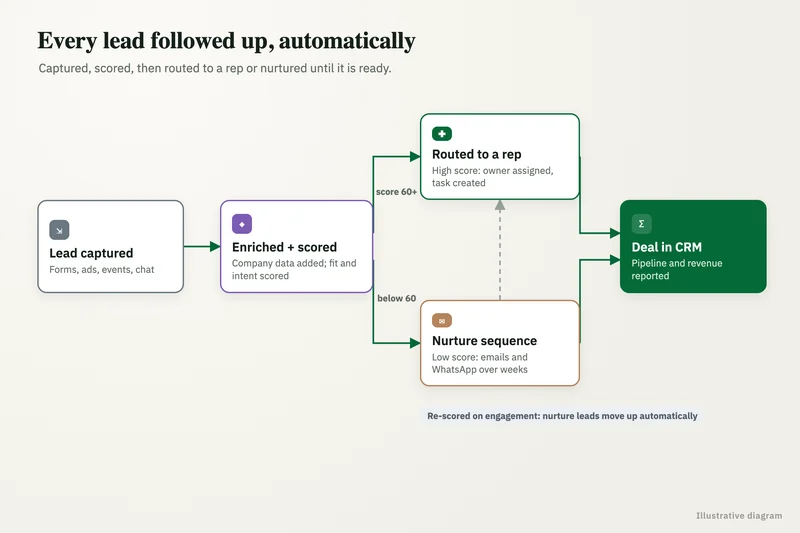
It covers the whole path from a name on a list to a booked meeting, with each step automated where it is safe and handed to a person where it is not. Most builds have four parts, connected through your CRM so every lead has one record and one history.
Lead qualification and follow-up are among the most requested small and mid-market AI workflows in 2026, according to industry reporting, and they are also where poorly built automation does the most brand damage. That is why the review steps below are part of the design, not optional extras.
- Prospecting: target account and contact lists built from your criteria and sources such as Clay and Apollo.
- Qualification: scoring rules plus an AI read of form answers, emails and company websites.
- Routing: assignment by territory, segment or round robin, with an alert to the owning rep.
- Follow-up: sequenced emails and tasks, with AI-drafted messages a rep approves.
How do you build outbound target lists with AI?
We start from a written ideal customer profile: industry, size, region, signals that suggest need and disqualifiers. A workflow then pulls candidate accounts from prospect data platforms and public sources, and a language model reads each company's website to check fit on the criteria a database field cannot capture, such as whether they sell to a certain market.
Each account lands in the CRM with the reason it qualified and links to its sources. Contacts are added only for the roles you target, and records pass through deduplication against existing accounts so reps never cold-email a current customer. Our data enrichment service covers the enrichment layer in more depth.
What you get
What we deliver
Scoped and quoted at a fixed price after a free review.
ICP and scoring model
Your ideal customer profile, disqualifiers and scoring rules written down and set up in the CRM.
Prospecting workflow
Automated account and contact list building with website checks, deduplication and cited reasons for fit.
Inbound routing
Enrichment, scoring, assignment and rep alerts that run within minutes of a lead arriving.
Follow-up drafting
AI-written emails from CRM context, delivered to reps as tasks to review and send.
Consent controls
Consent and opt-out fields checked by every workflow before any call or message goes out.
Funnel dashboard
Leads by source, time to first touch, conversion by stage and spend per qualified lead.
How does AI qualify and route inbound leads?
When a form, chat or email lead arrives, a workflow enriches it, applies your scoring rules and asks a language model to read anything free-text, such as the project description, to flag intent and urgency. The lead is then assigned in HubSpot or Salesforce and the rep gets an alert with a short summary.
Speed matters here more than cleverness. A lead routed in minutes with a clear summary usually gets a better first call than one that waits in a shared inbox. Low-quality and spam submissions are filtered into a review list rather than deleted, so nothing good is lost to an overly strict rule.
Can AI write and send follow-up emails?
It can write them well; we recommend a rep approves them before sending, at least at first. The model drafts each message from CRM context: what the lead asked, their company, prior emails and the stage of the deal. The rep sees the draft as a task, edits if needed and sends from their own mailbox.
Sequences stop automatically on a reply, a booked meeting or an unsubscribe. Every draft, edit and send is logged, which shows over time which messages perform and where the model needs tighter instructions.
How do you measure whether the system is working?
We agree the measures before build so nobody argues about them later: time from form fill to first touch, share of leads routed to the right owner, meetings booked per hundred qualified leads, and spend per qualified lead. A small dashboard pulls these straight from the CRM.
We also audit the scoring model on a regular cadence. Reps flag leads that were scored high but went nowhere, or scored low but closed, and those cases become test examples for the next round of rule and prompt changes. If a change lowers accuracy on the test set, it does not ship.
Are AI voice calls and automated outreach to leads legal?
Outbound calling is the biggest risk. The FCC ruled on February 8, 2024 that AI-generated voices count as artificial voices under the TCPA, so outbound calls using them need prior express consent. Some states, including Utah under its AI Policy Act and California under its bot disclosure law, also require telling people they are dealing with an AI.
We store consent status on each contact and make the workflow check it before any call or message, honor opt-outs everywhere at once, and keep a record of the source of every contact. This is not legal advice; your counsel should confirm the rules for your channels and markets.
What does the system cost to run each month?
Running costs are data provider fees per record, automation platform runs, model calls for scoring and drafting, and your email sending tools. They scale with list size and lead volume, so we set a monthly cap and report spend per qualified lead.
We build at a fixed price after a free review of your CRM, current funnel and ideal customer profile. All provider accounts and the CRM configuration stay in your name.
Case study · Logistics company, UK
Route planning automation
Dispatch typed every address into Google Maps, which optimizes only 25 stops and cannot add time at each stop. A Python tool that loads addresses automatically, adds buffer time per stop and optimizes the full route.
- Manual address entry eliminated
- Delivery estimates customers could rely on

How it works
How an engagement runs
- 01
Free review
We look at your CRM, lead sources, current routing and the customers you want more of.
- 02
Fixed quote
We agree the ICP, scoring, workflows and channels, then quote a fixed price.
- 03
Build
We build prospecting, routing and follow-up in a sandbox or test pipeline first.
- 04
Controlled launch
We go live on one segment or territory and compare results with the rest.
- 05
Scale and hand over
We extend to all segments, train reps and ops, and hand over every account and workflow.
FAQ
Frequently asked questions
Can AI find and qualify leads for B2B sales?
Yes. AI can build target lists from your ideal customer profile, read company websites to confirm fit, and score inbound leads from form answers and enrichment data. A rep still owns the conversation once a lead is qualified.
Is AI lead generation different from buying a lead list?
Yes. A bought list is a static file. A lead system built the way we build it creates lists to your own criteria, checks each account against them, keeps records current in your CRM and drives follow-up, so the pipeline keeps working after the first send.
Can AI qualify leads in HubSpot automatically?
Yes. A HubSpot workflow can send each new lead to an enrichment and scoring service, write the score and a short summary back to the contact, and assign it to a rep. Leads the model is unsure about go to a review view.
Are AI voice calls to leads legal?
Outbound calls using AI-generated voices need prior express consent under the TCPA, following the FCC's February 8, 2024 ruling, and some states require disclosure that the caller is an AI. Check with counsel; this is not legal advice.
Will AI-written emails sound generic?
Not if they are drafted from real context: the lead's request, their company and the deal stage. Rep review, plus logs of which messages get replies, keeps quality improving rather than sliding into templates.
Which CRMs do you build lead generation into?
Mostly HubSpot and Salesforce, and others with a usable API. The system lives in your CRM so reps keep one record per lead and one place to work.
Keep reading
Related pages
Get started
Tell us what you want automated
Describe the task, the systems involved and the volume. We reply within one business day with an architecture, the tools we would use, running costs and a fixed-price build plan.
- Free 30-minute build review
- Fixed quote before any work starts
- You own the accounts, code, prompts and data
Prefer email? info@aiimplementationconsultants.com
Get a free build plan
Two lines is enough to start.