
Supplier scouting
Supplier identification tools that find, screen and rank vendors for your buyers
We build supplier identification tools that search for candidate vendors, collect evidence about each one and apply your screening rules automatically, so buyers start from a ranked shortlist instead of a blank search bar. It is for procurement, sourcing and supplier quality teams who repeat the same scouting work for every new part, material or region.
Get a free build plan
Two lines is enough. A specialist replies within one business day.
Quick answer
Can AI find and qualify suppliers?
Yes. AI supplier identification tools search websites, directories and trade sources for companies that make a given product, extract facts such as capabilities, certifications, locations and capacity, then score each candidate against your screening rules. Buyers receive a ranked shortlist with source links for every claim, and a person makes the final call.
- Search, extraction and screening run as one repeatable pipeline per sourcing request.
- Every supplier fact links back to the page it came from.
- Your own screening rules decide the ranking, not a vendor's black box.
- Shortlists land in a supplier database your team can filter and reuse.
How does automated supplier identification work?
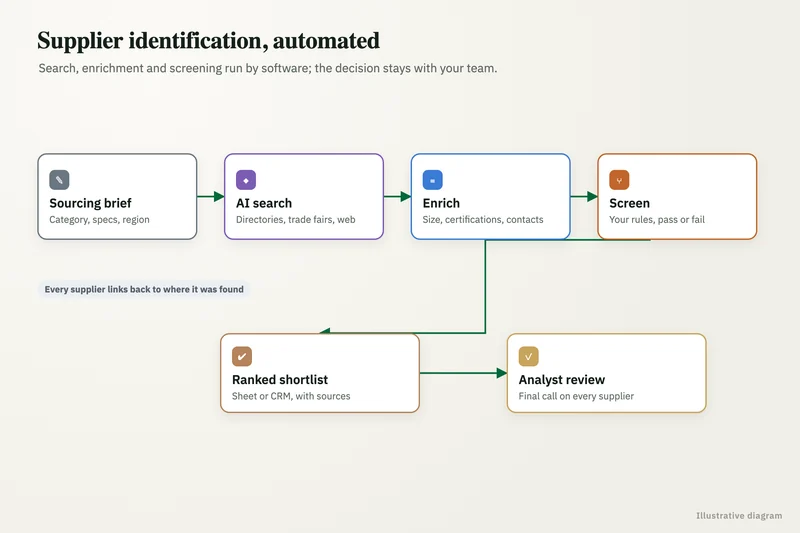
It runs the same steps a sourcing analyst would, only faster and with a record of each one. A request comes in with the part, material or service, the target regions and the must-have criteria. The tool generates search queries, visits candidate websites and directory listings, and extracts structured facts into one profile per company.
Those profiles then pass through your screening rules. A rule might require a specific certification, exclude trading companies posing as manufacturers, demand a minimum plant size or limit results to certain countries. Candidates that pass are scored and ranked; the ones that fail keep a note explaining which rule removed them, so a buyer can override the decision with one click.
- Input: a sourcing brief with product, specs, regions and hard requirements.
- Discovery: web search, company sites, trade directories and lists you already hold.
- Extraction: capabilities, materials, certifications, locations, contact routes, evidence links.
- Screening: your pass, fail and scoring rules applied the same way every time.
- Output: a ranked shortlist in a sheet, database or your sourcing system.
What results has supplier discovery automation produced?
For a sourcing and supplier quality consultancy, we built two tools: one finds candidate suppliers, the other applies the client's screening rules automatically. Together they delivered an 85% time saving and a 91% cost saving on supplier scouting. More detail sits in our case studies.
The lesson from that project shapes every build. The search part is easy to demo; the value comes from encoding the screening knowledge that lives in a senior buyer's head, so junior staff and the tool both apply it consistently.
What you get
What we deliver
Scoped and quoted at a fixed price after a free review.
Screening rulebook
Your buyers' pass, fail and scoring criteria written down and turned into rules the tool applies on every run.
Discovery engine
Query generation, web and directory search, and page fetching tuned to your categories and regions.
Supplier profiles
One structured record per company with capabilities, certifications, locations and a source link for each fact.
Ranked shortlist
Scored candidates with the reason each one passed or failed, ready to filter and compare side by side.
Supplier database
A growing, deduplicated store of every supplier found, reusable across future sourcing requests.
RFI drafts
Optional first-contact emails built from each profile, queued for a buyer to review and send.
Where does the supplier data come from?
Public sources do most of the work: company websites, product pages, published certificates, trade directories and industry association lists. Where you hold paid database access or past RFQ responses, the tool can read those too, within the terms of each source.
We keep each source's text and URL with the extracted fact. When the tool says a supplier holds a certain certification, the buyer can open the page that says so. Facts with no source are marked unverified and never count toward a pass.
How do you stop the AI from inventing suppliers or facts?
We only let the model extract from pages the tool actually fetched, never answer from memory. Every company in the output must map to a real URL, and every field must quote or point to its source text.
On top of that, deduplication merges the same company found under different names, and a sample of each run is spot-checked by a person against the sources. If extraction quality on a field drops, the eval set flags it before buyers notice.
How does the shortlist fit into our sourcing process?
Results go wherever your buyers already work. Small teams often use a filterable Google Sheet or an AppSheet app; larger ones push profiles into the supplier master in their ERP or a dedicated database with side-by-side comparison views.
Outreach stays with your people. The tool can draft a first RFI email per supplier using the facts it found, but a buyer reviews and sends it. Supplier responses can then be read back into the profile so the database improves with each project instead of starting over.
Which systems can the tool connect to?
Inputs and outputs follow your existing setup. Sourcing briefs can arrive through a form, a shared mailbox or a row in a planning sheet, and results can write to Google Sheets, SharePoint lists, an AppSheet app, a Postgres database or the vendor master in NetSuite or another ERP through its API.
We usually add a comparison view that puts shortlisted suppliers side by side on the fields buyers care about most, plus filters by region, capability and screening status. When a supplier later becomes approved, that status flows back to the database so the next search ranks known, vetted vendors above new names.
What does a supplier scouting tool cost to run?
Running costs come from search API calls, page fetching and model calls per candidate, and they rise with how many suppliers each request screens. We cap spend per sourcing request, log every call and show cost per shortlist in a simple report.
The build is quoted at a fixed price after a free review of a few past sourcing requests. You own the code, prompts, rules and the supplier database it builds.
Case study · Sourcing and supplier quality consultancy
Supplier scouting automation
Analysts found and filtered suppliers by hand on Google for every client brief. Two tools that find candidate suppliers and apply the client's screening rules automatically.
- 85% time saving
- 91% cost saving

How it works
How an engagement runs
- 01
Free review
We walk through three or four past sourcing requests and how your team screened the results.
- 02
Rules workshop
We capture the screening logic from your senior buyers and agree output fields and destination.
- 03
Build
We build discovery, extraction and screening, then test them against requests where you already know the right answer.
- 04
Pilot
Buyers run live requests and compare the shortlist with their own research before relying on it.
- 05
Handover
We hand over accounts, code and the database, and train the team to edit rules themselves.
FAQ
Frequently asked questions
Can AI really find new suppliers we do not already know?
Yes, that is the main use. By generating many search angles per product and region and reading the sites it finds, the tool surfaces manufacturers a buyer would rarely reach by manual searching. Every result still links to its source so a person can confirm it.
How is supplier identification different from a supplier directory?
A directory lists companies that paid or registered to appear. An identification tool searches across many sources, including company websites, and applies your own screening rules, so the shortlist reflects your requirements rather than a directory's ranking.
Can the tool check certifications like ISO 9001?
It can find where a supplier claims a certification and link to that page or certificate. Confirming the certificate is current with the issuing body remains a step for your quality team, and the tool marks the field as claimed until someone verifies it.
Does it work for niche or regulated industries?
It works best where suppliers publish their capabilities online, which includes many engineering and industrial niches. In tightly regulated categories the screening rules get stricter and more facts stay on mandatory human verification, but the discovery and comparison work is the same.
Who owns the supplier data the tool collects?
You do. The database, rules, prompts and code sit in your accounts, and the data stays usable even if you stop working with us.
Can it contact suppliers automatically?
It can draft outreach, but we keep sending with a person. Automated first contact from an unreviewed shortlist risks reaching the wrong companies with the wrong request, which costs more goodwill than the time it saves.
Keep reading
Related pages
Get started
Tell us what you want automated
Describe the task, the systems involved and the volume. We reply within one business day with an architecture, the tools we would use, running costs and a fixed-price build plan.
- Free 30-minute build review
- Fixed quote before any work starts
- You own the accounts, code, prompts and data
Prefer email? info@aiimplementationconsultants.com
Get a free build plan
Two lines is enough to start.