

Document processing
AI document processing that turns PDFs and emails into clean system records
We build AI document processing pipelines that pull invoices, purchase orders, forms and contracts out of inboxes and folders, extract the fields you need and write them into your ERP, CRM or database. It is for finance, operations and back-office leads who already know which documents eat their team's week and want a working pipeline, not a slide about one.
Get a free build plan
Two lines is enough. A specialist replies within one business day.
Quick answer
How does AI document processing work?
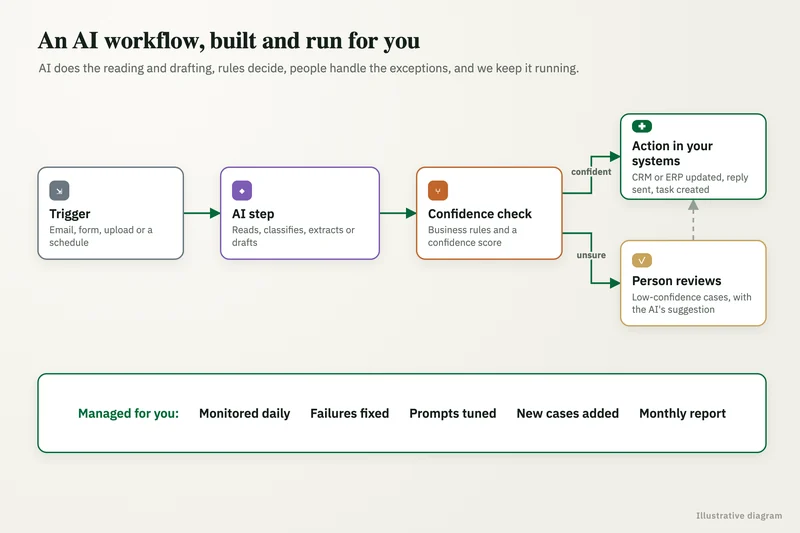
AI document processing reads incoming files such as invoices, purchase orders and forms, extracts named fields with a language model, checks each value against business rules and confidence thresholds, and posts approved records into systems like QuickBooks, NetSuite or Salesforce. Low-confidence fields go to a human review queue instead of straight into your books.
- Every extracted field carries a confidence score and passes validation rules before posting.
- Uncertain documents land in a review queue where a person approves or corrects them.
- Corrections are logged and used to tune prompts and rules over time.
- You own the mailbox connections, prompts, code and every processed record.
What does AI document processing actually do?
It replaces the person who opens an attachment, reads it and retypes the numbers somewhere else. A pipeline watches a source, such as an accounts payable mailbox, a SharePoint library or a Google Drive folder, classifies each file, extracts the fields you care about and writes a structured record to the target system.
Older tools needed a fixed template for every vendor layout. Intelligent document processing built on current language models reads the page the way a clerk would, so a new supplier's invoice usually works on day one without a new template. What it still needs is a clear schema: field names, formats, required values and the rules that decide whether a record is safe to post.
One of our case studies shows the pattern on spreadsheets rather than PDFs: an Australian insurance brokerage received a differently shaped file from every insurer, and an automated pipeline standardized them into one dashboard, cutting report time from 4-5 hours to under 5 minutes and lifting reporting accuracy from about 75% to 99%.
Which documents and systems can you connect?
Most projects start with one high-volume document type and one destination. The common ones are below; mixed batches are handled by a classification step that routes each file to the right extractor.
- Finance: vendor invoices, credit notes, receipts, bank statements, W-9s, posted to QuickBooks, NetSuite or Xero-style ledgers through their APIs.
- Operations: purchase orders, packing slips, bills of lading, delivery confirmations, matched against open orders in the ERP.
- Sales and service: signed order forms, applications and intake forms, written to Salesforce or HubSpot records.
- Legal and HR: contracts and onboarding packets, with key dates, parties and renewal terms pulled into a tracker.
- Sources: Outlook or Gmail inboxes, SharePoint, Google Drive, SFTP drops and scanner folders.
What you get
What we deliver
Scoped and quoted at a fixed price after a free review.
Document schema
A written field list per document type with formats, required values and the validation rules each record must pass.
Extraction pipeline
Intake from your inbox or folders, classification, extraction and posting, built in n8n or Python depending on volume.
Review queue
A screen showing the original page beside extracted values, with approve and edit actions and a full audit trail.
Eval set
Real documents with known answers, scored per field before launch and rerun after any prompt or model change.
System connectors
API connections to QuickBooks, NetSuite, Salesforce, HubSpot or your database, with retries and duplicate checks.
Monitoring
Daily volumes, exception rates, spend per document and alerts when a source stops sending files.
How accurate is AI extraction from PDFs and scans?
Accuracy depends on the document and the field, so we measure it on your files instead of quoting a number. Before build, we assemble an eval set of real documents with known correct values and score each field, which tells you where the model is reliable and where a person must look.
In production, three checks sit between extraction and posting. First, each field gets a confidence score, and anything under its threshold is flagged. Second, validation rules catch mistakes a model cannot see on its own: line items that do not sum to the total, a vendor missing from the master list, a PO number with no open order, a date in the future. Third, anything flagged goes to a review queue where a person sees the original page beside the extracted values and approves or fixes them in seconds.
Thresholds start strict and loosen only when the review log shows a field is consistently right. Every correction is stored, so drift is visible and the eval set grows.
What does the review queue look like for your team?
It is a simple screen your team already has access to, often a Google Sheet, an AppSheet app or a view inside the target system. Each row shows the document, the extracted fields with low-confidence values highlighted, and approve or edit buttons.
Approvals trigger the post to the ledger or CRM, and every action records who approved what and when. Anything that touches payments stays behind a human approval by default, which keeps auditors comfortable and keeps a wrong bank detail from reaching a payment run.
What does it cost to run each month?
Running costs come from model calls per page, storage and the automation platform, and they scale with volume. We set a cost cap per document and per day in the pipeline, log the spend of every call and route easy pages to cheaper models while hard ones go to stronger ones.
We quote the build at a fixed price after a free review of sample documents. For third-party market rates on implementation work, see our AI implementation cost guide.
How is sensitive document data protected?
The pipeline runs in accounts you own, using API tiers where the model vendor does not train on your data. Files stay in your storage, and logs keep prompts and outputs for audit with access limited to named staff.
Documents with protected health information need a vendor that has signed a Business Associate Agreement, and major model vendors sign BAAs only on certain API or enterprise tiers, not consumer plans. We pick the model and hosting with that in mind, including open-weight models in your own cloud when the data should never leave it.
Case study · Insurance brokerage, Australia
Automation and dashboarding
Policy data arrived as spreadsheets from several insurers, each in a different structure, and every client report took hours of manual cleanup. An automated pipeline that standardizes every insurer's file and feeds a single reporting dashboard.
- Report time cut from 4-5 hours to under 5 minutes
- Reporting accuracy up from about 75% to 99%

How it works
How an engagement runs
- 01
Free review
You send a sample of real documents and tell us where the data must land; we check feasibility and volume.
- 02
Fixed quote
We agree the document types, fields, rules and target systems, then quote a fixed price.
- 03
Build and score
We build the pipeline and score it against the eval set, sharing per-field results.
- 04
Shadow run
The pipeline processes live documents beside your team for a period, with nothing posted until results match.
- 05
Go live
We switch on posting with the review queue in place, train your reviewers and hand over every account.
FAQ
Frequently asked questions
Can AI read invoices and enter them into QuickBooks?
Yes. A pipeline can extract vendor, dates, line items, tax and totals from invoice PDFs, check them against your vendor list and open purchase orders, and create bills in QuickBooks through its API. Anything below its confidence threshold waits for a person to approve.
What is the difference between OCR and intelligent document processing?
OCR turns an image into text. Intelligent document processing adds understanding on top: it classifies the document, finds the right fields regardless of layout, validates them and sends the result to another system. Most modern pipelines use both.
Do we need a template for every vendor layout?
Usually not. Language-model extraction handles new layouts without templates in most cases. We still test unusual formats, such as handwritten or heavily scanned pages, in the eval set before launch.
What happens when the AI gets a field wrong?
Validation rules and confidence thresholds catch most errors before posting and send the document to a review queue. If a wrong value does get through, the audit log shows its source, the record can be reversed, and the correction feeds the next round of tuning.
Can it process handwritten forms or poor scans?
Often, but accuracy drops with image quality, so we measure it on your actual scans first. If a field is unreliable, we keep it on mandatory human review rather than letting it post automatically.
How long does a document processing project take?
A single document type going into one system is usually the fastest path to production. The timeline depends on volume, layout variety and the target system's API, and we confirm it in the fixed quote after reviewing your samples.
Keep reading
Related pages
Get started
Tell us what you want automated
Describe the task, the systems involved and the volume. We reply within one business day with an architecture, the tools we would use, running costs and a fixed-price build plan.
- Free 30-minute build review
- Fixed quote before any work starts
- You own the accounts, code, prompts and data
Prefer email? info@aiimplementationconsultants.com
Get a free build plan
Two lines is enough to start.